Bank Statement to Excel
With Reviewed Output
Stop copying transactions row by row. We convert your bank statements with human-reviewed output.
Bank Statements Are Uniquely Frustrating
Generic PDF converters fail on bank statements. Here is why—and how we solve each problem.
Running balances that don't add up
Exports and copy-paste workflows can break running balances. We can include balance columns and flag rows that need review.
Multi-page statements that break across tables
Headers repeat, rows split between pages, columns misalign. We stitch everything into one clean table.
Different formats from every bank
Chase looks nothing like Wells Fargo. We map representative samples into your preferred column structure.
Check images mixed with transactions
Scanned check images interrupt the data flow. We extract just the transaction data you need.
Statement periods that overlap
Overlapping periods need careful review so duplicate transactions and missing dates are easier to catch.
Bank and Account Statements. Structured for Review.
We review representative samples first, then convert statements into transaction-level Excel or CSV with source-aware cleanup.
Turn account statements into transaction data your team can use.
Demand around bank statement, account statement, PDF to Excel, and data extraction from PDF points to one practical buyer need: transaction rows that are clean enough for bookkeeping, lending, reconciliation, or review.
Bookkeeping cleanup
Transaction-level Excel or CSV with date, description, debit, credit, balance, and source file.
Lender or underwriting review
Normalize statement packets so reviewers can sort transactions and spot missing periods.
Recurring account statement batches
Use email, Drive, or manual upload intake once a sample output is approved.
Scanned or image-based statements
Use OCR plus review for low-confidence rows, wrapped descriptions, and page breaks.
From Chaos to Crystal Clear
See the difference professional conversion makes.
Before
Messy PDF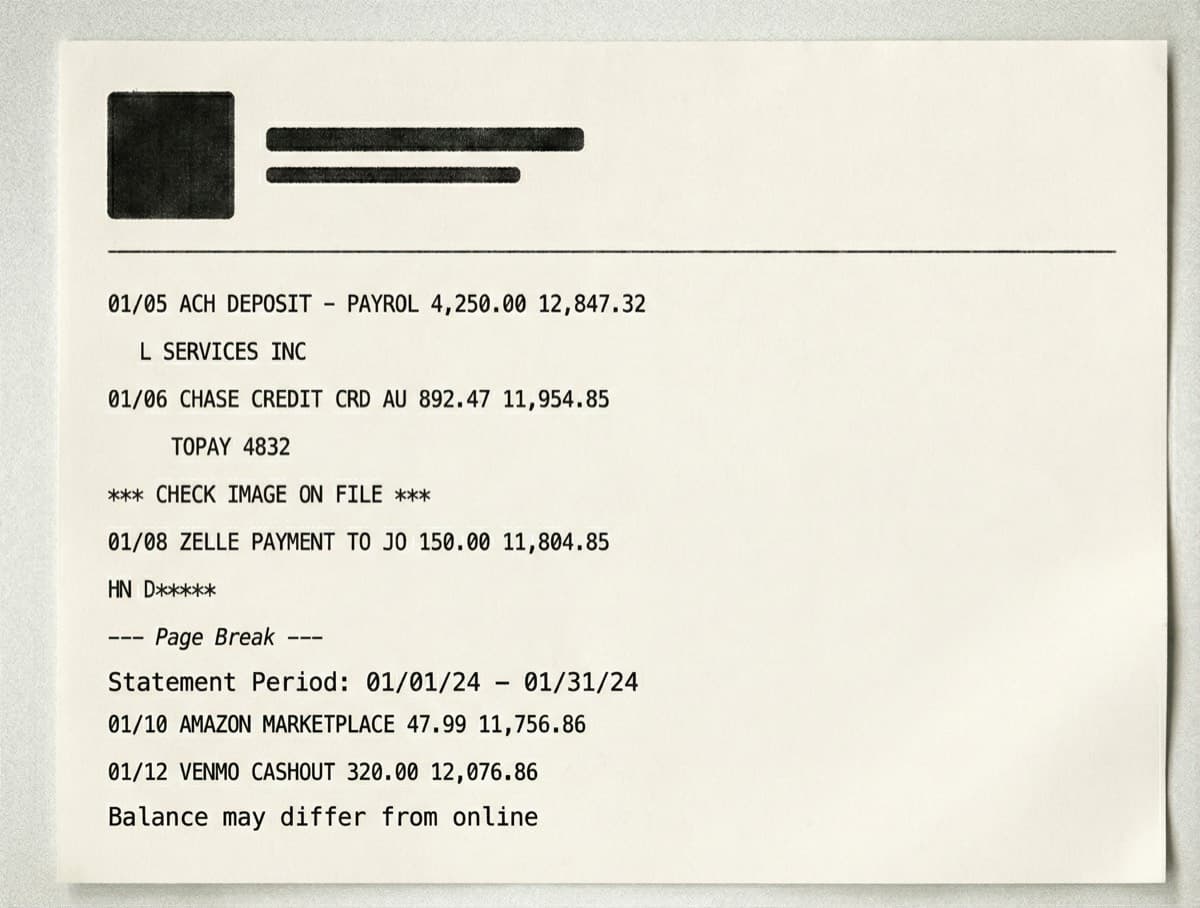
- Descriptions split across multiple lines
- Check images interrupting transaction flow
- Page breaks splitting tables
After
Reviewed Output| Date | Description | Debit | Credit | Balance |
|---|---|---|---|---|
| 01/05/2024 | ACH DEPOSIT - PAYROLL | 4,250.00 | 12,847.32 | |
| 01/06/2024 | CHASE CREDIT CRD AUTOPAY | 892.47 | 11,954.85 | |
| 01/08/2024 | ZELLE PAYMENT TO JOHN D | 150.00 | 11,804.85 | |
| 01/10/2024 | AMAZON MARKETPLACE | 47.99 | 11,756.86 | |
| 01/12/2024 | VENMO CASHOUT | 320.00 | 12,076.86 | |
| 01/15/2024 | UTILITY BILL - ELECTRIC | 187.43 | 11,889.43 | |
| 01/18/2024 | WIRE TRANSFER RECEIVED | 2,500.00 | 14,389.43 | |
| 01/20/2024 | ACH DEPOSIT - PAYROLL | 4,250.00 | 18,639.43 |
- Clean, single-line descriptions
- Balance column included when present
- Ready for import into QuickBooks, Xero, or Excel
Simple, Transparent Pricing
Most bank statements qualify for our Quick Convert tier.
Quick Convert
- 1-3 bank statements
- Up to 50 pages total
- Excel or CSV output
Professional
- Up to 10 statements
- Up to 200 pages total
- Human verification pass
- Custom column mapping
Enterprise
- Custom statement volume
- Up to 500 pages
- OCR for poor quality scans
- Quote-based workflow setup
Need something custom? Upload a sample so we can scope the workflow.
View full pricing detailsCommon Questions
We regularly work with statements from large US banks, credit unions, regional banks, and card issuers. Upload a representative sample first so we can confirm the fields, output format, and review steps for your specific statement layout.
Yes. Our OCR technology handles scanned statements, photos of statements, and even faxed documents. For particularly poor quality scans, we recommend our Professional or Enterprise tiers which include enhanced OCR processing and human verification.
We can include running balances, compare transaction rows against statement totals where possible, and flag rows that need review. If you need recalculation or reconciliation rules, include that in the sample request.
We handle consolidated statements with multiple accounts. Each account gets its own sheet in the Excel file, with a summary sheet showing totals across all accounts. We maintain account numbers and clear labeling throughout.
Files are handled through the secure upload and delivery workflow. For sensitive documents, include your requirements in the quote request so we can confirm retention, access, NDA, or manual review expectations before processing.
Related Resources
Bank Statement Folder to Excel
How recurring statement folders become transaction-level Excel or CSV output.
Read ArticleData Extraction From PDF Service
When managed PDF data extraction is a better fit than self-service tools or APIs.
Read ArticleAre Free Online PDF to Excel Converters Safe?
We analyze the security risks of uploading sensitive financial documents to free online converters.
Read ArticleReady to Convert Your
Bank Statements?
Upload your bank statement PDFs and get clean, accurate Excel files back within 72 hours.
Questions? Email us at hello@dataconvertpro.com